- -9%

onsale
In Stock
In Stock
In Stock
In Stock

Available upon request
In Stock
Out of Stock
Out of Stock
Out of Stock
Out of Stock
Out of Stock
Out of Stock
Out of Stock
Out of Stock
Featured Products
Out of Stock
In Stock

In Stock
Out of Stock

The Da. Vinci Resolve Speed Editor, Da. Vinci Resolve Editor Keyboard, Da. Vinci Resolve Micro Panel and Da. Vinci Resolve Mini Panel all include Da. Vinci Resolve Studio. and nbsp;
Da. Vinci Resolve is the world's only solution that combines editing, color correction, visual effects, motion graphics and audio post production all in one software tool! Its elegant, modern interface is fast to learn and easy for new users, yet powerful for professionals. Da. Vinci Resolve lets you work faster and at a and nbsp;higher quality because you don't have to learn multiple apps or switch software for different tasks. That means you can work with camera original quality images throughout the entire process. It's like having your own post production studio in a and nbsp;single app! Best of all, by learning Da. Vinci Resolve, you're learning how to use the exact same tools used by Hollywood and nbsp;professionals!
High end professionals working on feature films and television shows use Da. Vinci Resolve more than any other solution! That's because it's known for incredible quality and creative tools that are light years beyond the competition. You get Da. Vinci's Emmy award winning image technology with 32-bit float processing, patented YRGB color science and a and nbsp;massive wide gamut color space for the latest HDR workflows. You also get the legendary quality of Fairlight audio processing for the best sound in the industry! With Da. Vinci Resolve, you get the same tools professional colorists, editors, VFX artists and sound engineers use every day to finish your favorite films and streaming television and nbsp;shows!
Da. Vinci Resolve 18 features a whole new way of remote collaboration using cloud based workflows! You can host project libraries using Blackmagic Cloud and collaborate on the same timeline, in real time with multiple users all over the world. The Proxy Generator app creates and manages proxies for you. Da. Vinci Resolve has a new proxy menu, which makes working with them automatic. You can relink original media and proxies in a single click! Apple Neural Engine support allows up to 30x faster playback on Apple Mac M1 models. Da. Vinci Resolve 18 includes new Resolve FX such as ultra beauty and 3D depth maps, improved subtitling for editors, Fairlight fixed bus to Flex. Bus conversion and and nbsp;more!
Da. Vinci Resolve is the only solution that lets you grow and build your own multi user post production studio! The newly redesigned project libraries are built for real time local and remote collaboration. While the new Blackmagic Cloud lets you host and access your projects from anywhere in the world. Now you can collaborate with editors, colorists, visual effects artists, and sound engineers all working together at the same time. Best of all, you no longer have to import and export files, translate projects, lose work, or conform and manage changes. Da. Vinci Resolve is the only application in the world that lets everyone work together in parallel on the same project and at the and nbsp;same and nbsp;time!
Da. Vinci Resolve is divided into pages, each of which gives you a and nbsp;dedicated workspace and tools for a and nbsp;specific task. Editing is done on the cut and edit pages, visual effects and motion graphics on the Fusion page, color correction on the color page, audio on the Fairlight page, and media organization and output on the media and deliver pages. All it takes is a and nbsp;single click to switch between and nbsp;tasks!
The edit page is the world's most advanced professional non-linear editor. The familiar track layout, dual monitor design and traditional workflow makes it easy for new users to learn while still being powerful enough for professional editors. It's perfect for larger projects such as feature films, television shows, streaming, commercials, documentaries and more. The edit page features drag and drop editing, context sensitive automatic trimming tools, fully customizable keyboard shortcuts so you can work faster, and a and nbsp;library full of hundreds of titles, transitions, and effects that you can add and animate. You also get complete media management, organization and timeline management and nbsp;tools.
The cut page is perfect for projects with tight deadlines that you have to turn around quickly. It's also great for documentary work. The cut page has a streamlined interface that's fast to learn and designed for speed. Features such as source tape, dual timelines, fast review, and smart editing tools help you work faster than ever. The sync bin and source overwrite tools are the fastest way to edit multicam programs, making it easy to create perfectly synchronized cut aways! Everything on the cut page is action based so every click does something. That means you'll spend more time editing and less time hunting for commands. Plus, the scalable interface is great for portable and nbsp;editing!
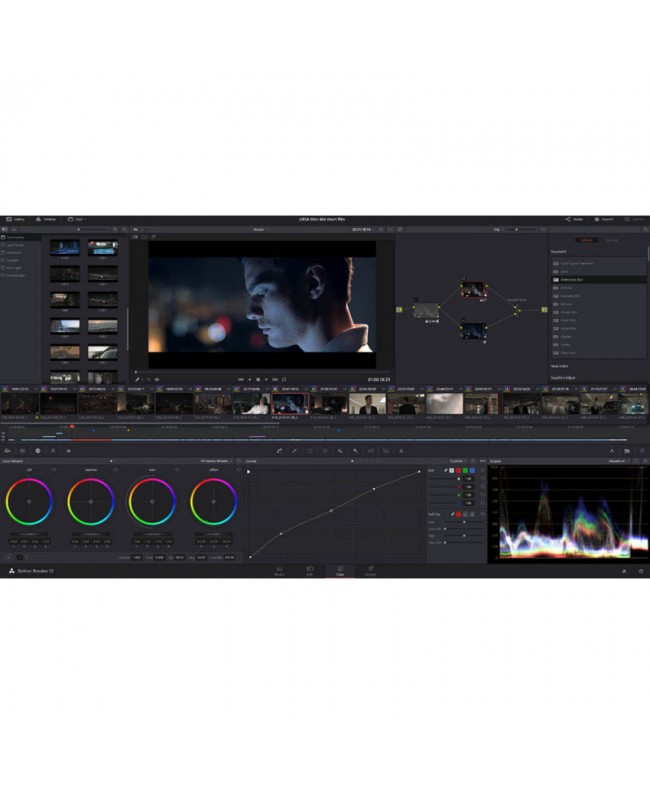
The Da. Vinci Resolve color page is Hollywood's most advanced color corrector and has been used to color and finish more high end feature films and television shows than any other system! It's also approachable with features designed to make it easier for new users to get great results while they continue to learn the advanced tools. For example, new primary control sliders will be familiar to anyone who's used image editing software, making it easy to adjust contrast, temperature, midtone detail, saturation and more. The color page has an incredible range of primary and secondary color grading features including Power. Windows, qualifiers, tracking, advanced HDR grading tools and nbsp;and and nbsp;more!
The Fusion page lets you create cinematic visual effects and broadcast quality motion graphics right inside of Da. Vinci Resolve! Fusion features a node based workflow that makes it faster and easier to create sophisticated effects and animations than you could ever create using a layer based approach. You get hundreds of 2D and 3D tools for visual effects and motion graphics, along with advanced animation curve and keyframe editors that allow you to create incredibly organic and realistic animations. Fusion has everything from point, planar and 3D camera tracking to rotoscope and keying tools for creating photorealistic composites, stunning animated titles, 3D particle systems and and nbsp;more!
The Fairlight page features hundreds of pro tools for audio post production. It's like having a professional digital audio workstation (DAW) built into your editing and color system! Familiar keyboard based editing tools let you work extremely fast, especially if you're moving to Fairlight from another system. The incredible new Fairlight Audio Core lets you work with up to 2,000 tracks at a time with realtime effects, EQ, and dynamics processing! You get sample accurate editing tools, advanced ADR and Foley, and Fairlight FX such as reverb, de-esser, hum remover and more. You can mix and master stereo, 5.1, 7.1, and even the latest immersive 3D audio formats, all within the same and nbsp;project!
The media and delivery pages have everything you need to import, manage and deliver final projects. The media page is a and nbsp;dedicated full screen workspace that lets you prepare footage, sync clips, organize media into bins and add metadata before you start editing. Use the clone palette to ensure every bit of data in the camera media cards is copied during backup. During edit or grading, stream video outputs to a and nbsp;remote client monitor via Deck. Link. You can output and upload files to You. Tube, Vimeo and Twitter from anywhere page using the quick export tool. The deliver page gives you total control over all encoding options and formats, along with a and nbsp;render queue for exporting multiple and nbsp;jobs!
Da. Vinci Resolve Studio 18 features over 100 GPU and CPU accelerated Resolve FX such as blurs, light effects, noise, image restoration, beauty enhancement, stylize and more! Version 18 adds even more plugins for depth map generation, surface tracking, fast noise, and despilling. There's even improvements to the beauty effect, edge detection and lens reflections. Automatically generate a and nbsp;3D matte of a and nbsp;scene with the depth map FX to grade or add effects to a and nbsp;background or foreground. Track the movement of textured surfaces with the surface tracker effect to apply images to t-shirts, flags and faces! All Resolve FX effects can be applied and animated in the cut, edit, Fusion and color and nbsp;pages!
The Da. Vinci Neural Engine uses state of the art deep neural networks and machine learning, along with artificial intelligence to power features such as facial recognition, object detection, smart reframing, speed warp retiming, super scale up-scaling, auto color and color matching and more! The Da. Vinci Neural Engine is entirely cross platform, using the latest GPU innovations for AI and deep learning to provide unparalleled performance and quality. The Da. Vinci Neural Engine provides simple tools to solve complex, repetitive and time consuming problems. For example, it enables facial recognition to sort and organize clips into bins based on people in the shot, to reframe shots and and nbsp;more.
With all the different workflows and systems available, you need a and nbsp;post production solution that's compatible and open enough to handle anything! Da. Vinci Resolve can be used with any type of storage ranging from direct attached hard drives to NAS and SAN systems. You and nbsp;can extend Da. Vinci Resolve with third party Open FX and audio plugins, or add third party title and motion graphics templates. New and nbsp;workflow integration and encoding APIs let developers integrate workflow and asset management systems with Da. Vinci Resolve. and nbsp;Plus, it works and nbsp;with all major file formats and post production software, making it easy to move files and nbsp;between Da. Vinci and nbsp;Resolve, Final Cut Pro, Media Composer, and Premiere and nbsp;Pro.
Specific References
On sale
In Stock
In Stock
In Stock
Out of Stock
bestseller

In Stock

In Stock

In Stock


In Stock

Available upon request

In Stock