- -5%
- New

onsale

In Stock

In Stock

Out of Stock


In Stock

Available upon request

In Stock
Out of Stock
Out of Stock

Available upon request

Out of Stock
Out of Stock
In Stock

In Stock
Download

Featured Products

Out of Stock
In Stock

In Stock
Out of Stock
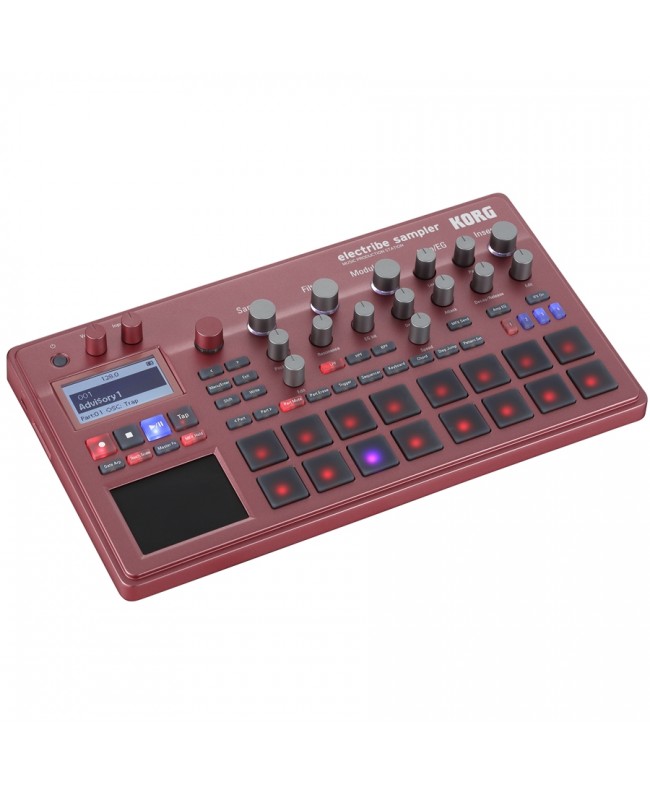
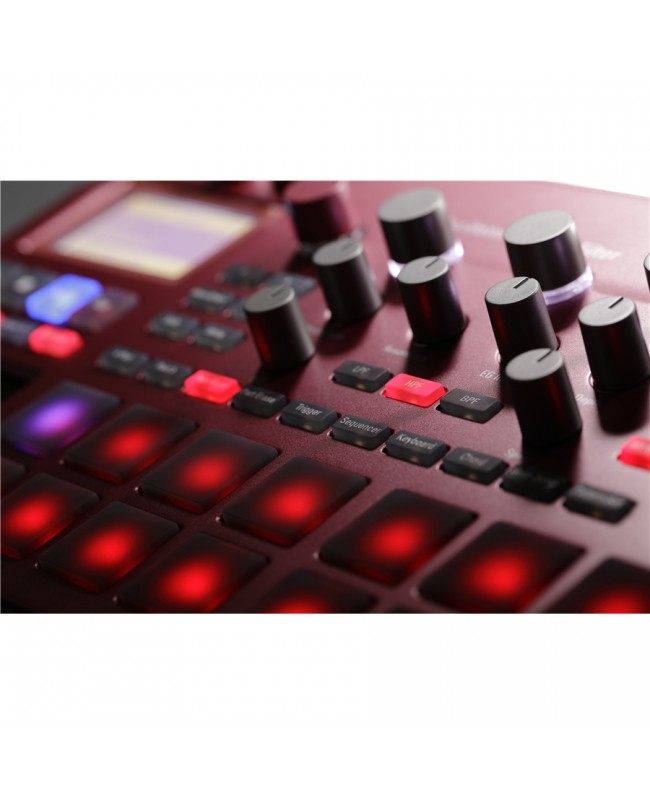
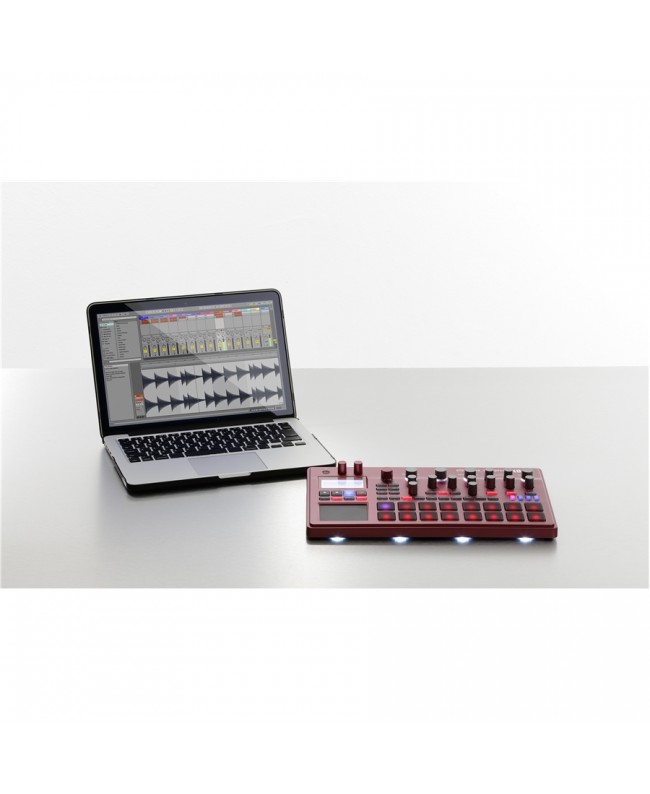
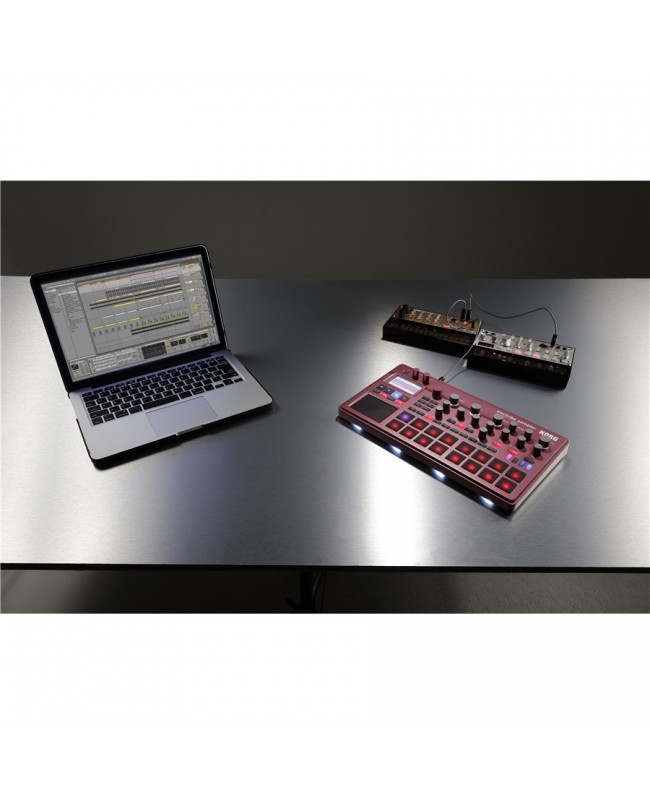

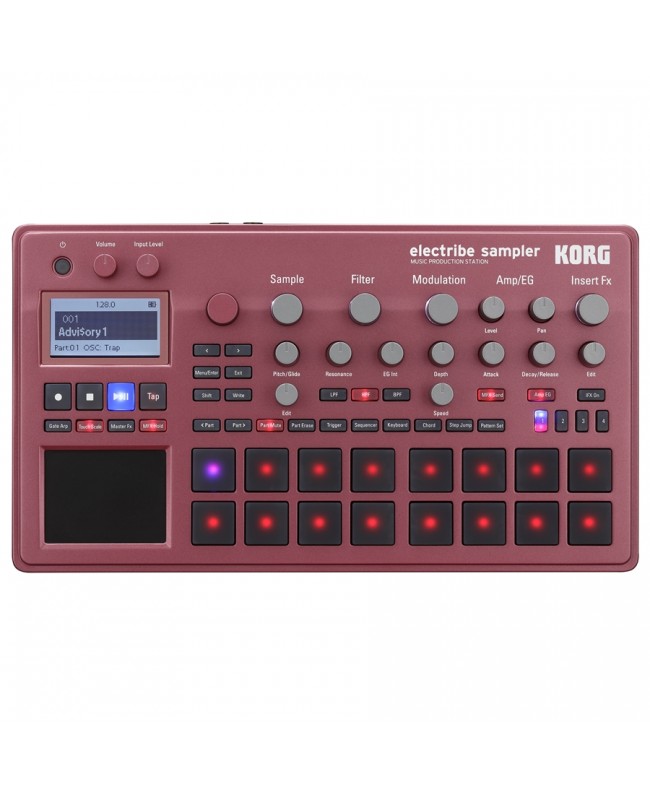
Continues the evolution of the electribe Sampler series - New red model - a nod to electribe history - New features thanks to updated firmware (vers. 2) - 200 additional patterns via download
Simplified sample interaction and editing thanks to potentiometers - Import any waveform and use it as an oscillator - Numerous ready-to-use resident samples - Modulation section for developing evolutionary sounds - Wide selection of insert effects to put the finishing touches on parts and patterns
From inspiration to pattern creation in the blink of an eye - Velocity-sensitive trigger pads and X/Y touch pads for inputting notes and generating melodies - Motion Sequence function for recording parameter movement (automations) - Last Step selector for originating special and unusual rhythmic patterns in real time - Groove: to give percussive patterns that touch of reality that doesn't hurt
From studio to stage, total control of your patterns - Control sequences in real time without compromise - Use Pattern Set and Pattern Chain to organize and manage complete arrangements - Apply effects in real time by interacting with the X/Y touch pad - Sync, MIDI and Audio In for integration into any set-up
Finalize your sequences professionally - Interoperability with Ableton Live: export patterns to Ableton format - Event recorder: capture your performances as you are playing them live
Electribe Sampler RD (red) is a groove box based on an open sound engine, which in addition to resident samples (presets) allows you to import audio samples to use as waveforms for oscillators. Effects, filters and the various applicable modulations will allow you to turn your ideas into music very quickly. All operations from sound selection to editing are easily performed using the potentiometers available on the instrument's dashboard. Programming and creating rhythms, bass lines and melodies are also exemplified through the different interfaces (touch pads, pads, step sequencer, MIDI IN) available, so you can quickly create your own sequences in a few simple steps.
The sequences created with the Electribe Sampler can be further evolved live, either within your computer by connecting via MIDI or analog sync to other instruments, or by exporting the sequences to Ableton Live format so they can be edited and finalized within the popular DAW software. Recent version 2 of the operating system introduced the highly sought-after pattern chain function, which extends the sequencer's potential in both live performance and music production. Aesthetically, the Korg Electribe Sampler also looks more attractive, thanks to a new red metal dashboard. New additional patterns also increase the instrument's sonic potential.
The possibility of materializing your ideas into beats takes shape. Meet electribe Sampler, a sampler + sequencer optimized to speed up the music composition and production stages.
Following the black-colored model, the lineup sees the introduction of a new red-colored galvanized metal model reminiscent of the historic ELECTRIBE SX. Complementing the eye-catching aesthetics are numerous backlit LEDs.
Updates allow us to constantly evolve the Electribe series. Version 2 of the operating system introduces undo and pattern chain functions. Users who already own or will purchase Electribe 2 and Electribe Sampler (the gray and black ones) can upgrade the instrument operating system and take advantage of these new functions.
Artists, sound designers and beat makers from around the world have created bonus patterns for the Electribe series complete with new sounds, musical phrases and sequences. These 237 patterns include audio samples, drum kits, and patterns that can be used in numerous electronic music contexts. Designed as reference material, these patterns can become the cue for your first beat-making experience, or a source of new inspiration for your own productions.
The electribe sampler allows you to import audio samples from SD cards and use them in beat production. There are as many as 499 user memories in which you can save the original waveforms you created using audio editing software, acquired from sample libraries, or sampled from audio sources connected directly to the instrument.
You will be free to edit the sampled/imported waveforms by varying their start and end points, pitch, and applying editing functions such as slice to them. The attack of each portion of the phrase is automatically detected and then sectioned in order to allow you to play the loops in time with the BPM speed of your project while minimizing the classic artifacts of these operations. The extrapolated portions (slices) are optionally assignable to specific steps, or employable as source sound for individual parts, thus individually playable even outside the original loop.
A resampling function is available with which you can create a new sample resulting from editing the original waveform: a phrase you programmed or a performance performed in real time with the Electribe Sampler. Further possibilities come from the combined use of slice and re-sampling. You can change the sequence order of the sounds in a rhythmic progression or phrase, or turn a phrase consisting of several parts into a new single sample.
The electribe sampler comes with numerous audio samples available from the moment the product is turned on. The range of genres and styles covered by the sample supply is remarkable: 179 drum and percussion sounds, among which you will find kick and snare essential for beat production, 33 loops, 31 vocal samples, 37 sound effects, and as many as 123 samples of instruments such as hits, shots, piano phrasing, organ, brass, and guitars. These samples come directly from the world's leading sound design companies, Sample Magic, Loopmasters, Prime Loops and Raw Cutz.
Electribe Sampler also provides you with 16 analog-derived oscillators and three filters.
Modulations greatly enrich a sound, a track, but are often difficult to implement because they are complex and have parameters that are not easy to interpret. In the Electribe Sampler, modulation sources such as envelope (EG) and LFO are already assigned to destinations such as filter cutoff and oscillator pitch. Korg has thoughtfully condensed Electribe Sampler's modulation management into just 3 parameters: selection of one of no less than 72 templates that include the effect (source) and what you want to apply it to (destination), intervention on the modulation speed, and control over the influence it will have on the original sound.
The new Korg Electribe Sampler is equipped with 32 insert effects applicable to each individual part, among which we find compressor, eq and overdrive, to allow you appropriate sound manipulation on each individual sound employed in your pattern.
For each part (sound), the Electribe Sampler allows you to compose musical phrases by entering notes on the 64 steps (16 steps X 4). You can create a base by combining up to a maximum of 16 parts for each pattern. The step sequencer is extremely intuitive. The 16 trigger pads and X/Y touch pad operate in various ways to suit your knowledge of music theory and your compositional needs in producing rhythmic parts and melodic phrases.
Korg electribe Sampler allows sound editing and sequencing in parallel: create your own sequence and intervene on the sounds as you play it back. An efficient way to produce beats, much more convenient and immediate than using DAW software since on the instrument you will find everything at your fingertips in one intuitive working environment.
The Motion Sequence function allows you to record and replay potentiometer movements, then automate editing parameters.
The Last Step function allows you to vary the number of playable steps in the sequence of the selected part in real time. The purpose is to reproduce unusual and unconventional rhythmic designs by assigning a different step duration to the pattern of each part.
twenty-five are the groove templates from which to select, for each part, the one most appropriate to the interpretative technique of percussive lines played by instruments such as conga and bongo. By selecting a groove type and adjusting its dynamics you can develop more believable rhythmic patterns, going beyond the classic squareness of 16-step sequencers.
Sequences programmed on the Electribe Sampler come to life during your live performances. For example, by taking advantage of the Step Jump function you can jump from one step to another on the fly by simply pressing the dedicated pad. Electribe Sampler allows you to play via the trigger pads and touch pad and also record during your onstage performances; impossible to hit a wrong note once you set the scale and key note. Electribe Sampler in live use does not limit you to just playing the programmed sequences, but gives you a way to express yourself by editing them in real time, applying effects, filters and all the other unique functions designed for live use.
With the Pattern Set function you assign your favorite sequences to trigger pads, so you can quickly switch from one pattern to another by simply pressing the corresponding pad. While you're playing you can change the sequence to vary, for example, the accompaniment base. Version 2.0 of the OS sees the introduction of the new Pattern Chain function with which you can sequence multiple patterns in order to create longer, longer-lasting arrangements.
You can use the Touch Pad to control the multi-effect Master as if it were a Kaoss Pad. From spatial resonance effects to loopers to give your sequences that extra edge, or Seq Reverse or Odd Stepper to radically alter the sound of your patterns. Incredible added value to your performances with electribe Sampler.
Thanks to the sync input you can easily synchronize to other analog instruments or groove boxes from the Korg house (and beyond), you can connect the electribe to the electribe sampler, to a Volca series product, or to the SQ-1. MIDI IN and OUT ports, and USB MIDI also allow interconnection with DAW software installed on your computer and with other MIDI-compatible instruments.
Electribe Sampler comes with an audio input that allows you to sample from external sources, but not only that. In fact, by connecting an external source and selecting Audio In as the oscillator you can process the audio from it from the built-in filter and effects.
In the past, live setups based on hardware instruments required numerous synthesizers, samplers, and sequencers. Today, with the Electribe you can fulfill many of these roles by exploiting it as the main element of an instrument chain, or as an additional instrument for your performances. The built-in sequencer can receive from keyboards and transmit to other MIDI instruments the notes you play or record. Feel free to experiment with concatenation with other instruments.
Using your favorite DAW software you can collect, organize and develop the various backing tracks created in the Electribe Sampler into complete songs. KORG has collaborated with the team from the German company Ableton to offer users optimized and rapid project sharing between the hardware instrument and Live software. In addition to classic audio export, the new Electribes feature export to Ableton Live format. Once the file is opened within the software you will find the audio of each part on separate tracks in the project so that you can edit, edit, add effects, record new parts, and proceed to the final mixing and mastering of your track. Included with Korg Electribe Sampler you will find a LITE version of Ableton Live* software.
Everything you do with the Electribe Sampler in real time, including interaction with trigger pads and touch pads can be recorded with the Event Recorder feature. Recorded performances are saved in the Electribe Sampler's native format and are therefore playable at any time, even instantly directly from the Electribe Sampler itself.
Korg electribe Sampler can be used in the absence of power, in any situation so even when traveling, thanks to the special slot that can accommodate 6 AA batteries.
Type: PCM sound engine + Analog modeling
Maximum Polyphony: 24 voices. The polyphony of an entire pattern is subject to variation depending on the type of oscillator, filter and insert effect applied. The parameters of each individual voice are simplified, then shared in a polyphonic part.
Samples: (920) samples, Pitch/Glide, Edit
Types of Samples: Analog (16), Audio In (2), Kick (37), Snare (44), Clap (12), HiHat (37), Cymbal (8), Hits (33), Shots (44), Voice (31), SE (7), FX (30), Tom (10), Percussion (31), Phrase (15), Loop (22), PCM (31), User Sample (499)
Filters: 3 Filters with controls for (Cutoff), Resonance, EG Int, LPF/HPF/BPF
Modulations: Types (72); controls Depth, Speed
Amp/Envelope Generator: Level, Pan, Attack, Decay/Release, Amp EG On/Off
Scale Types: 35
Template Gate Arpeggiator: 50
Sample Rate: 48 kHz
AD/DA Conversion: 24 bit
User Memory: Up to 499 locations
Memory: Maximum 270 seconds (calculated with mono material)
*Dependent on SD card size
*Presets included
Editing: Start/End Point, Loop Start Point, Tune, Time Slice, Level, Direction, Resampling
Insert: One slot for each part. 38 effect types available on each slot; Edit, Insert FX On/Off controls
Master: One slot. 32 available effect types controllable by Touch Pad, Master FX On/Off, Master FX Hold On/Off
Step: 16 steps x 4
Parts: Multi-timbric with 16 parts (each associated with a dedicated MIDI channel) (one part consists of a sound and its steps, insert effect, modulation sequence, etc.)
Pattern: 250 patterns: (150 Preset/100 Init) (a pattern includes parts, master effect, key, scale setting, etc.)
Motion Sequence: 24 automatons (parameters) that can be recorded for each pattern
Groove Template: 25
Pattern Set: 64 pattern locations
Pattern Chain: Up to 250 patterns that can be concatenated in sequence
Export formats: Ableton Live Project and file.WAV (48kHz/16bit)
Event Recording: 100 dedicated memory locations
Pads: 16 pads (velocity sensitive)
Pad operating modes: Trigger, Sequencer, Keyboard, Chord, Step Jump, Pattern Set
Touch Pad X/Y operating modes: Gate Arp, Touch Scale, Master FX
Audio:
Stereo output (L/Mono - R) on ¼ jack connectors
Headphone output (Stereo mini jack)
Audio input (Stereo mini jack) for sampling and processing external sources
MIDI: DIN In and Out ports (on appropriate adapters provided)
USB: Micro B type port
Sync: In, Out (Stereo mini jack)
SD Card (512 MB -- 2 GB), SDHC Card (Up to 32 GB)
Power sources: AC power adapter (DC 9V), or 6 AA-type batteries (Alkaline or Nickel metal hybrid)
Battery life: About 5 hours (with Power Saving on, using Nickel metal hybrid batteries)
Current consumption: less than 500 mA
Galvanized metal
339 x 189 x 45 mm / 13.35 x 7.44 x 1.77
1.6 kg / 3.53 lbs
Red (electribe2-RD) and Black (electribe2s)
Specific References

On sale

In Stock
Out of Stock

Out of Stock
bestseller
In Stock
In Stock
Out of Stock
In Stock

Available upon request
In Stock