- New

onsale

In Stock

In Stock

Out of Stock


In Stock

Available upon request

In Stock
Out of Stock

Out of Stock

Available upon request

Out of Stock
Out of Stock
In Stock

In Stock
Download

Featured Products

Out of Stock
In Stock

In Stock
Out of Stock

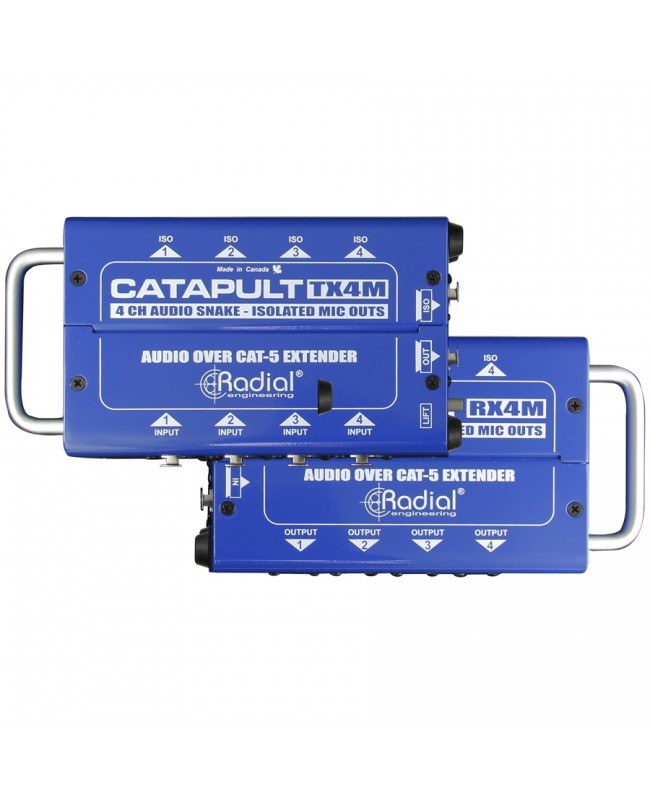
RADIAL ENGINEERING's RX4M Catapult is a Reception Module with 4 mic-level isolated XLR-M outputs (-40 ~ 0 dB) and 1 set of XLR-M pass-throughs. It is basically a 4-channel audio snake that can send analog and AES digital audio signals over standard Cat 5 or 6 cable. Wide availability and low cost of this connection allows its use for carrying balanced audio channels on large stages, and in fixed installations the exploitation of existing pre-wired networks to connect various rooms together.
Available in 6 configurations, Catapult offers a choice of 3 input modules and 3 output modules. Each input module has 4 XLR inputs, 4 XLR thru-puts along with 2 Neutrik Ethercon outputs to connect Cat 5 cable to the desired output module. These have Ethercon-type RJ45 input and thru-put, as well as two sets of XLR outputs. Modules can be ordered without transformers for sub-snake or transmit AES audio signals; with microphone isolation transformers for signal splitting between FOH, monitor or recording system; with line-level isolation transformers to eliminate system noise. A ground lift switch on each terminal allows the Ethernet cable to be connected, eliminating noise and hum caused by ground loops. As with all Radial products, Catapult is ideal for touring use due to its construction of rugged 14-gauge steel and powder coating that will keep it looking like new for years. Inside, a two-sided PCB was used to mount the connectors and transformers doubling the solder joints for maximum durability.
As with all audio systems, it is a good idea to turn off the sound system or set the system levels to zero before making connections. This will prevent connection or power-up transients from damaging more sensitive components such as tweeters.
To use Catapult in its simplest form, connect TX4 and RX4 together using a Cat 5 or Cat 6 cable. To send 48V phantom power to feed condenser microphones or active direct boxes, the cable must be shielded. If transmitting line signals, shielding is not necessary given the twisted pair configuration, but shielded cables will still be useful since they are less sensitive to noise. Since twisted pairs are wound together tightly in a compact jacket, it is good to send signals with similar level on the same wire. This will reduce crosstalk from signals with higher levels (such as +4 dB line levels) polluting lower level output signals (such as -30dB microphone levels). The TX and RX modules feature two sets of XLR connectors for more versatile connections. This is basically a simple Y-cable that can be useful in certain situations.
These modules are used to split a mic signal between the two mixers. Although transformers can be placed inside the TX4M transmit module or RX4M receive module, these are usually placed inside the transmit module as they allow for more flexibility.
For example, it may happen in a concert that you need to send your on-stage microphone signal to a monitor mixer on stage, and simultaneously to a distant FOH mixer. TX4M would allow you to connect your microphones directly to the FOH console so that it can provide phantom power, while the high-performance Eclipse transformers keep the monitor mixer isolated by preventing ground loops.
You can also use the same TX4M module to isolate microphones feeding a separate recording system. Transformers are truly exceptional devices: in case of saturation they provide surprising help.
As described above, transformers eliminate noise. These problems are often more predominant in situations where the two connection points are far apart. Signal isolation allows audio to pass through, blocking stray DC voltages that can interfere with the system. Line-level isolators are usually placed in the receive module (RX4L) of the system. If you use Catapult as a return snake for monitors or from a crossover, isolating the stage from the front-of-house (FOH) will avoid a lot of poblems. Simply connect the output from the console to Catapult and the isolated outputs to amplifier racks or powered speakers. The Eclipse transformers inside can handle up to 15dB without distortion. You can use the unisolated outputs to supply signal to other devices, such as a recorder.
Each Catapult module is equipped with a Ground Lift switch. Set it as inactive. Once connected, if you experience noise, try to activate the Ground Lift switch in either module (Transmit/Receive). It is usually best to activate it at the end of transmission, where there is generally a microphone connection, while at the end of reception there is a connection to an electronic device, (mixer), which already has its own ground. Caution: activating the Ground Lift switch automatically disables phantom power: condenser microphones or active DI boxes will not work.
Specific References

On sale

In Stock
Out of Stock

Out of Stock
bestseller
In Stock
In Stock
Out of Stock
In Stock

Available upon request
In Stock